
Summary
exe.dev is a new service that is a weird cross-over between a VPS, Heroku, and a local Docker pod.
You ssh to it. You ask nicely to get a new VM. And you get it in 5 seconds.
Except it’s a fully functional Ubuntu image, connected to the web with an HTTPS server and disk persistence, and you are root.
Claude and I love this.
This is not sponsored content. There is NO sponsored content on this blog.
Quick. Dirty. And online.
Before LLM, I had plenty of projects I started but never finished. Now, thanks to Claude code, I have plenty of buggy proof of concepts!
And of course, I need to put them online.
My go-to tool for that used to be to get a VPS on OVH or Hetzner, two amazing European providers. They are flexible, cheap, you get full control of the OS, SSH access, and unmettered bandwith.
But I usually had to set up several services in one server to make them worth the time to order them, and of course, our darling AI is quite good at deploying once on a virgin pristine server, but on one with a lot of running stuff, it’s kinda playing with your luck.
Plus, it’s slow to have to define the partitions, wait for the server to arrive, reinstall and configure nginx, deploy SSL, ensure separation of users, install the ssh key...
But there’s a new player in town: exe.dev.
It’s my new provider for half-assed projects cemetery.
It’s just ssh
The UI for exe.dev is mainly the terminal. In fact, you start by sshing into their server (yep, try it!):
ssh exe.devAnd you get right into the registration process. It’s quick and nerdy, and once you are done, you are ready to host your first project.
You get to choose between various offers, and they are not nearly as cheap as a VPS. In fact, compared to my usual VPS, they are quite expensive:
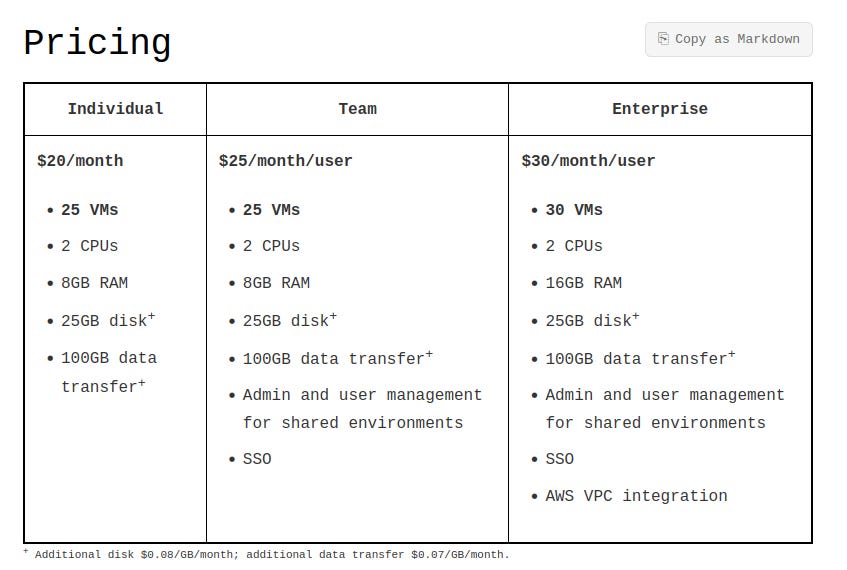
But the point here is the convenience: you get a mix between a full server access, on-demand VM, and pre-configured hosting (like Heroku), all in one.
Let me explain.
I have the first offer, so I get a small server with:
2 CPUs
8GB RAM
25GB disk+
100GB data transfer+
Nothing crazy. Actually, small specs for 2026. The OVH offers are much better:

But it can be divided into 25 VMs. And this is where it’s becoming very interesting.
Every time I want to put a prototype online, I can just:
ssh exe.dev -i .ssh/my_exe_dev_key.pubThen I’ll get a shell where I can manipulate all the VMs:
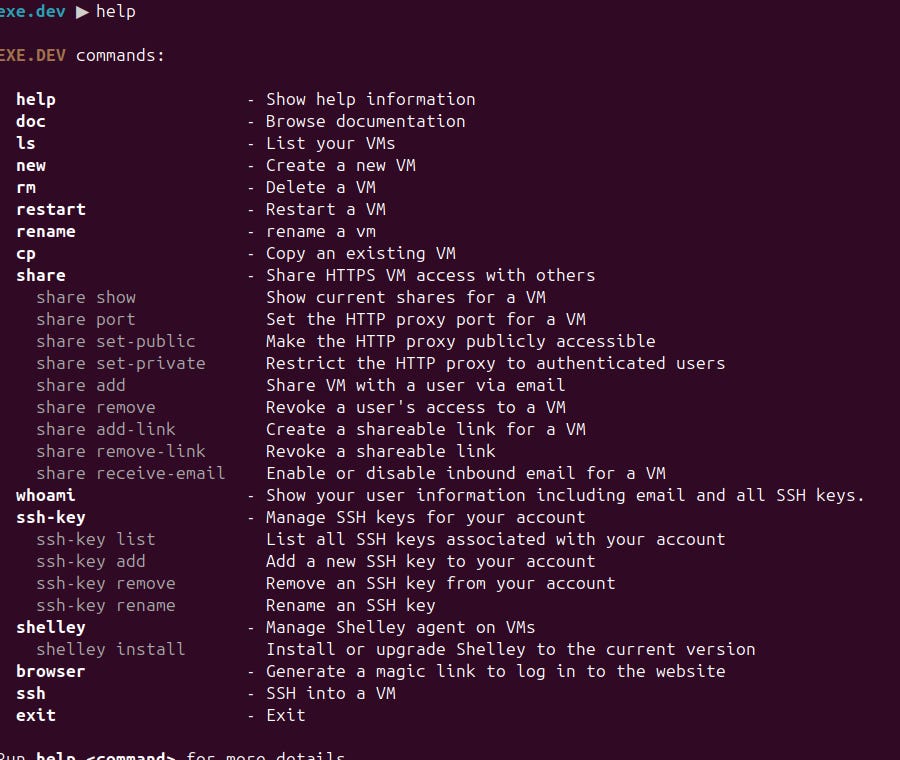
Add a new one, decommission one, and expose one publicly to the web. It’s all instant, one command away.
Creating a new, fresh, Ubuntu VM:
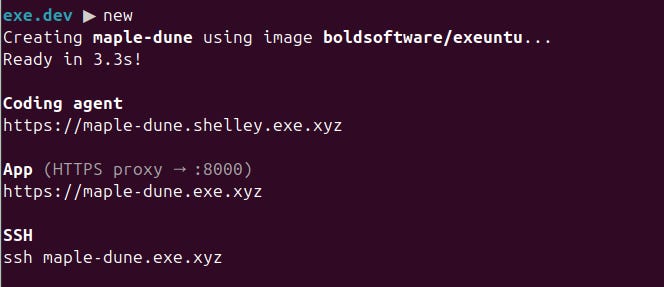
Done, 3 seconds.
Exposing it online:

Done, port 443 from outside is now mapped to localhost:8000, with https and a nice automatically generated SSL cert.
Connecting to the VM is just regular ssh:
❯ ssh maple-dune.exe.xyz -i .ssh/my_exe_dev_key.pub

You are on maple-dune.exe.xyz. The disk is persistent. You have 'sudo'.

For support and documentation, "ssh exe.dev" or visit https://exe.dev/

Docker is installed and works; try "docker run --rm alpine:latest echo hello world"
That’s it. I want to serve a Django site? Install Redis? Make a crawler? Setup a cron that regularly makes an API call? I got it all there.
You can scp, apt and vi to your heart’s content.
Experiment done?

Finished. Forgotten.
And since it’s all regular SSH and Ubuntu, Claudes loves it. It can deploy like a champ and in a blink. Thanks to the isolation, it also cannot wreck all my services at once in case of an abundance of enthusiasm.
Is it fast? No. You share 2 CPUs among 25 VMs, it’s more akin to having a cloud Raspberry Pi.
But my little WSGI + SQlite setups don’t need a big boy house before they are ready and polished and perfect.
So probably never.
I pay yearly domain name fees for all of them, though.
Just in case.
Funnily, one reader posted this recently, about a different service with a similar value proposal: https://lewoudar.substack.com/p/lets-talk-about-flyio-sprites-aka
Just wanted to say I unsubscribed this year from most substacks because I was over subscribed.
I kept yours because it is funny and you write about interesting stuff related to my field (data engineering). Thanks for your work.